by Carolyn Edlund
Explore online tools that help sculptors present their artwork from multiple angles and in realistic settings.
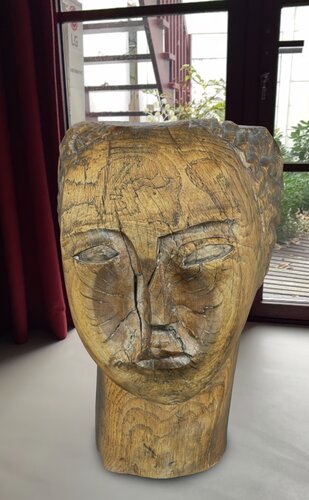
Sculpture shown in situ using augmented reality. Courtesy: Plinth
Selling sculpture online presents a particular challenge. A photograph can capture the beauty of a piece, but it doesn’t always communicate its depth, scale, texture, or appearance from different angles.
For sculptors who want to give potential buyers a better viewing experience, digital technology offers some interesting options. Interactive 3D models, virtual exhibitions, and augmented reality can help collectors examine artwork and understand how it might look in a physical setting.
Some tools are surprisingly easy to use, while others require a digital model of the sculpture. Here are five options worth exploring:
Online tools for displaying sculpture
Sketchfab allows artists to upload interactive 3D models that visitors can rotate, zoom in on, and examine from different perspectives. These models can be embedded directly into an artist’s website, giving collectors a more complete view of the work. Sketchfab offers a free plan and paid subscriptions with additional features, including private models and greater control over their presentation. Artists must supply an existing 3D model, since the platform doesn’t create one from ordinary photographs.
Plinth specializes in creating digital 3D versions of physical artwork. Using an iPhone 12 or newer, artists photograph a sculpture while the app guides them through the capture process. Plinth processes those images into a model that can be shared online or exported for use with other software. The first model credit is free, and paid plans begin at $3.99 per month. Plinth is especially useful for artists who want to create interactive digital versions of existing sculptures without purchasing specialized scanning equipment.
Kunstmatrix provides virtual gallery spaces where artists can organize exhibitions that include paintings, sculpture, and other artwork. Visitors navigate through the exhibition online, viewing the work in a simulated gallery environment. Artists can share exhibitions through a link or embed them on their websites. Plans start at €10 per month, excluding taxes. Kunstmatrix is particularly useful for sculptors who want to present a collection of work in a professional exhibition setting.
ArtPlacer offers virtual exhibitions where sculptors can display their artwork on customizable pedestals. Artists upload photographs of their sculptures with the backgrounds removed, then position them within a gallery environment. They can adjust the size, location, and appearance of the pedestals to create an attractive presentation. Unlike an interactive 3D model, the sculpture is represented by a photographic image. This makes ArtPlacer a practical option for artists who want to create virtual exhibitions without learning 3D modeling software. Virtual exhibition features are available through paid plans.
Byrst ARt uses augmented reality to help artists present their work in realistic settings. Its sculpture capture feature allows artists to photograph an object from multiple angles and create a textured 3D model. Artwork can then be viewed through AR, shared with potential buyers, or embedded on a website. The app also offers tools for presenting artwork in room settings. Byrst ARt is available for compatible Apple devices, with a free trial and paid subscriptions. It is worth investigating for sculptors interested in showing work at scale or preparing presentations for clients.
How do you create a 3D model of your sculpture?
Several of these tools require a digital model rather than an ordinary photograph. Fortunately, artists have options for creating one. One approach is photogrammetry, which uses photographs taken from multiple angles to reconstruct the shape and surface of an object. Apps such as Plinth and Byrst ARt offer ways to create models using a smartphone.
Good lighting and careful photography make a difference. Highly polished metal, glass, transparent materials, and reflective surfaces can be difficult for scanning software to reproduce accurately. Artists may need to experiment or seek professional assistance for complicated pieces.
Blender is free, open-source software that allows artists to design and model three-dimensional objects. It requires time to learn, but can be useful for sculptors who want to develop original designs or create digital versions of proposed work. Once a model has been created, it can be uploaded to a compatible viewing platform, shared through a link, or used in an augmented reality presentation.
Using 3D presentations to enhance sculpture commissions
Three-dimensional presentations can be especially useful when an artist is creating a commissioned sculpture. For example, a sculptor commissioned to create a memorial portrait of a loved one could share a digital model with the family before beginning the finished work. Family members could view the sculpture from different angles and consider whether the likeness, pose, and expression reflect the person they wish to remember.
This gives the family an opportunity to provide feedback and request adjustments before the artist commits to the final materials and fabrication. It also helps the sculptor and client agree on the details of a deeply personal commission.
Artists can use digital modeling software such as Blender to develop a proposed design, then share an interactive version through Sketchfab or a compatible augmented reality platform. For sculptors who work from physical models, a small clay or plaster maquette could be scanned and converted into a digital presentation. This may be particularly useful for public art proposals, architectural installations, and custom residential commissions.
Digital mockups should be identified as visualizations rather than exact representations of the finished work. Accurate measurements, material specifications, and installation requirements still need to be confirmed.
Making sculpture easier to experience online
Sculptors don’t necessarily need sophisticated equipment or advanced technical skills to improve the way they present their work online. An artist with good photographs can create a virtual exhibition using ArtPlacer. Someone who wants collectors to rotate and examine an artwork might choose Sketchfab, while a smartphone scanning app could provide the digital model needed to get started.
The best choice depends on the type of sculpture, the presentation you want to create, and the time you’re willing to spend learning the technology. Consider experimenting with one piece first. A successful digital presentation can become a useful addition to your portfolio, website, and conversations with prospective buyers.

Speak Your Mind